Help & FAQ

Getting the most out of GreenAI chat.

Answers to the things people ask most: choosing a model, which decides how hard - and how expensively - GreenAI thinks about your question, searching the web, so a reply can use what's online today rather than only what the model was trained on, and forking, which branches a conversation off in a new direction without losing the one you have. More sections will land here as questions come in; if yours isn't answered, email hello@greenai.org.uk.

Choosing a model

Quick, Deep, and when to reach for Frontier Think

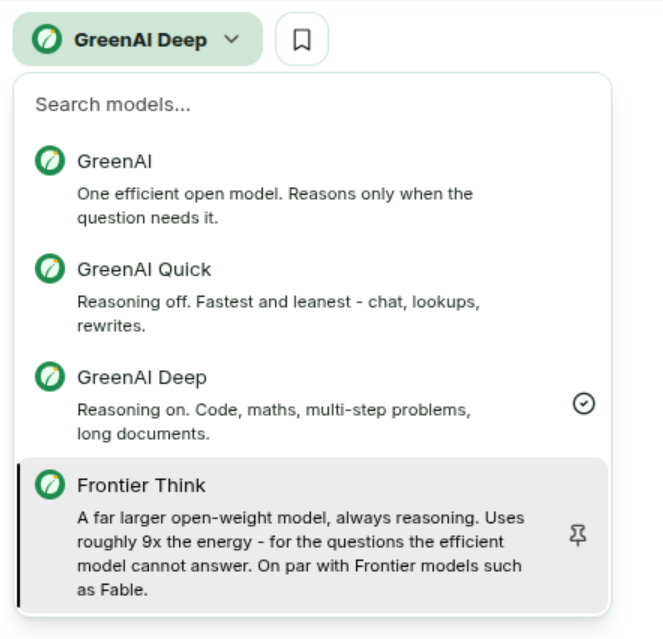
Where do I choose?

The button at the top left of the chat, showing whichever model you're on. Click it for the list.

The GreenAI model picker open, listing GreenAI, GreenAI Quick, GreenAI Deep and Frontier Think, each with a one-line description.
The picker: GreenAI, Quick, Deep and Frontier Think.

The pin beside an entry keeps it in easy reach. Your choice sticks to the conversation, so a new chat starts back on whatever you picked last.

What's the difference between them?

The first three are all the same efficient open model. They differ only in whether it reasons - works the problem through in a hidden trace before answering - which is where nearly all the energy goes. Frontier Think is a different, much larger model.

  • GreenAI - the default, and the one to stay on. It decides per message: reasoning off for chat and lookups, on when the question looks like it needs it.
  • GreenAI Quick - reasoning always off. Fastest and leanest: chat, lookups, rewrites, summaries.
  • GreenAI Deep - reasoning always on. Code, maths, multi-step problems, long documents.
  • Frontier Think - a far larger open-weight model, always reasoning, for the questions the efficient model cannot answer.

Why not just leave it on GreenAI?

Do - that's the point of it. Quick and Deep are for when you disagree with the router: you want a one-line answer to something that looks complicated, or you want the model to think properly about something that looks trivial. Picking one is an override, not an upgrade.

What does reasoning cost?

Roughly an order of magnitude. On a simple question - "what's the capital of France?" - reasoning off produced 10 completion tokens against 264 with it on, and the energy footer tracks the tokens generated. That's the whole reason the switch exists.

When should I use Frontier Think?

Rarely, and deliberately. It's for the question the efficient model has already failed at - a hard proof, a gnarly refactor, an argument that needs holding together over pages. It's genuinely more capable: benchmarks put it alongside frontier models like Claude's Fable.

It also uses roughly 9x the energy of the default model, because it runs about nine times as many active parameters per token and always reasons. Your reply's footer will say so. The honest advice is the same as with search: ask the efficient model first, and escalate only when the answer isn't good enough.

Can I send it an image?

Yes - attach it to any of them. The default model is text-only, so a message carrying an image is routed to a small open vision model instead, which is cheaper per token, not dearer. Frontier Think reads images itself.

Forking a conversation

Branching a chat without losing the original

What does "fork" actually do?

Forking makes a copy of a conversation as a brand-new chat, cut at the message you clicked. The original is untouched - nothing is moved or deleted - so you can take an idea somewhere else and still come back to where you were.

Hover any message and use the fork button. You then pick how much of the conversation travels with you.

What are the three fork options?

All three keep the straight line of messages leading to the one you clicked (the "target"). They differ in how much of the rest of the conversation comes along - the alternatives created when you edit a message or regenerate a reply.

  • Visible messages only. Just the straight path you can see. Any edited or regenerated alternatives are left behind - the cleanest, smallest copy.
  • Include related branches. That same path, plus the alternative versions hanging directly off it.
  • Include all to/from here. Everything in the conversation down to the target's depth, including branches that split off much earlier and grew threads of their own.

What's the difference between "Include related branches" and "Include all to/from here"?

How far sideways they reach. "Related branches" takes one step off your path; "all to/from here" takes the whole tree.

        A
      /   \
     B     B'      <- an alternative reply
     |      |
     C     C'
     |
  [target]
  • Include related branches copies A → B → C → target, plus B'. The alternatives touching your path come across, but their own descendants don't - so B' arrives as a stub with nothing after it.
  • Include all to/from here copies B' and C' - every message at or above the target's level, whether or not it has anything to do with the path you were on.

In short: related branches = the alternatives next to your conversation; all to/from here = the entire conversation tree, trimmed at that depth.

What does "Start fork here" do?

It flips the direction of the cut. Normally a fork copies from the beginning of the conversation up to the message you clicked. With "Start fork here" ticked, it copies from that message forward to the end instead - useful for lifting the tail of a long chat into its own thread and leaving the preamble behind.

What does "Remember" do?

It saves the option you just clicked as your default. From then on the fork button skips the pop-up entirely - one click forks straight away using the saved option.

It's stored in your browser, not your account, so it applies to the device you set it on. To change or turn it off, go to Settings → Chat → Conversations:

  • Use default fork option - the switch that turns one-click forking on and off.
  • Default fork option - the dropdown that appears when it's on, for picking which of the three behaviours to use.
  • Start fork from target message by default - makes "Start fork here" the standing behaviour.

Which one should I pick?

Visible messages only, nearly always: it gives the new chat exactly the thread you were reading, and nothing else to scroll past. Reach for the other two when the alternatives themselves are the thing you want to keep - a rejected draft you might come back to, say.

It makes no difference to energy either way. What the model is sent on your next message is the straight path back through the conversation, so off-path branches cost nothing per reply whether you copy them or not.
Still stuck?

Email hello@greenai.org.uk and we'll answer - and probably add it to this page.